
The Short Answer: Do Not Update Just Because 22.1.0 Exists
Switch firmware 22.1.0 is the current version many users search for because it looks like the obvious answer to every emulator setup problem. It is newer, it appears near the top of version tables, and it sounds like the safest target if a game refuses to boot.
That assumption causes a lot of unnecessary troubleshooting. A firmware update is useful when it solves a specific requirement. It is risky when it changes a stable setup without a rollback record. If your emulator already launches the titles you care about, and no game update or emulator guide asks for firmware 22.1.0, the best move may be to document your current setup first and wait.
SwitchFirmware currently lists Firmware 22.1.0 as the latest international firmware entry in the firmware version table, with a recorded file size of 324MB. Nintendo's official system update timeline also lists Ver. 22.1.0 as an official system version. Those two facts tell you the version exists and should be tracked. They do not prove that every emulator user should install it today.
Use this article as a decision checklist before you touch your firmware folder, keys files, emulator build, or Android import flow.
Official release timeline: Nintendo Support: Nintendo Switch System Updates and Change History
What Firmware 22.1.0 Changes for Emulator Users
For emulator users, a firmware number is not only a number. It is part of a version combination:
| Component | Why it matters |
|---|---|
| Firmware version | Provides system components expected by some titles and updates |
| Private keys dump | Must match the workflow you are legally maintaining |
| Emulator build | Determines install behavior, compatibility, and regression risk |
| Game update version | May require newer system behavior than the base game |
| Platform | Desktop and Android behave differently even with the same files |
The mistake is treating firmware 22.1.0 as a magic fix. It might help if your problem is genuinely caused by an older system component. It will not fix a bad dump, a missing private keys file, a broken game update, a stale emulator build, or a driver problem.
A safer way to think about it is this: firmware 22.1.0 is a candidate version, not a diagnosis.
Should You Install Firmware 22.1.0?
Start with the reason you are updating.
| Situation | Recommendation |
|---|---|
| A guide or emulator note specifically requires 22.1.0 | Consider updating, but record your current setup first |
| A game update asks for newer system components | Update deliberately and test one known-good title afterward |
| Your current setup works | Do not update immediately unless you have a reason |
| You are troubleshooting random crashes | Check emulator build, logs, content integrity, and drivers first |
| You are on Android | Be extra cautious; storage and driver issues often look like firmware issues |
The most reliable update reason is a specific requirement. The weakest update reason is "latest should be better." Newer firmware can be correct, but it can also introduce a new variable while you are still missing the real cause.
Before Updating: Record the Working Version Set
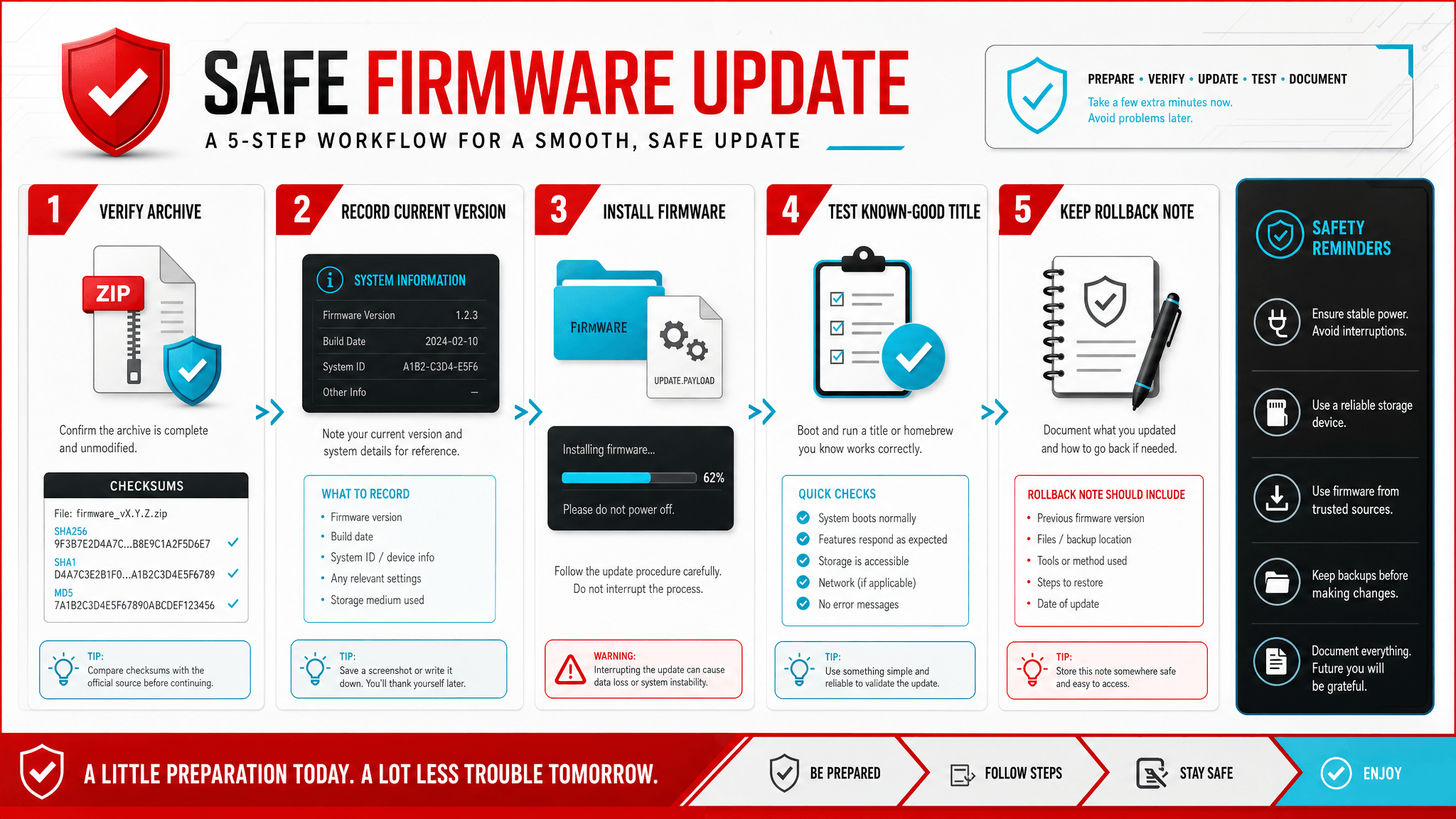
Before installing firmware 22.1.0, write down your current working setup. This takes less than two minutes and saves hours later.
Emulator:
Emulator build/date:
Platform: desktop / Android
Current firmware:
Target firmware: 22.1.0
Private keys dump date:
Game or update being tested:
Current result:
Reason for updating:
Rollback available: yes / no
If you cannot fill in this note, you are not ready to update. The goal is not bureaucracy. The goal is to make your change reversible.
When users update without a record, every later symptom becomes ambiguous. Did the new firmware cause the crash? Did the emulator update change behavior? Did the game update require different content? Did an Android import fail silently? Without a baseline, you cannot tell.
Verify the Firmware Archive Before Installing
A firmware archive should be verified before installation. The SwitchFirmware firmware page includes version, file size, and checksum fields so you can compare your local file before changing your setup.
Verification matters because corrupted or incomplete archives can produce symptoms that look like compatibility problems. A bad archive may install partially, fail during extraction, or leave an emulator with missing system components. If you skip verification, you may blame firmware 22.1.0 when the real issue is file integrity.
Use this order:
- Confirm the version name.
- Confirm the file size is plausible for the listed version.
- Compare the provided MD5 or SHA value when available.
- Install through the emulator's supported workflow.
- Restart the emulator and test one known-good title.
Do not copy firmware files into guessed directories if your emulator has an import or install function. Emulator-specific workflows exist because folder layout matters.
Do Not Update Firmware and Keys at the Same Time Unless You Must
Firmware and keys are often discussed together, but changing both at once makes troubleshooting harder. If you replace firmware 22.1.0 and your private keys file in the same session, then a failure has at least two likely causes.
A cleaner approach is:
- Confirm your private keys file is in the correct location.
- Confirm the emulator can read it.
- Record the current firmware version.
- Install firmware 22.1.0.
- Test before changing any other variable.
If you discover a keys problem, solve that separately. If you discover a firmware problem, solve that separately. The fewer variables you change, the faster you find the real issue.
If your immediate error mentions keys, start with the prod.keys setup guide and the prod.keys not found troubleshooting page before assuming firmware 22.1.0 is the fix.
Desktop and Android Need Different Expectations
Firmware 22.1.0 can behave differently across desktop and Android emulator workflows. The firmware version may be identical, but the surrounding system is not.
Android adds several failure points:
- scoped storage restrictions;
- file picker/import behavior;
- limited device memory;
- thermal throttling;
- chipset-specific GPU drivers;
- app sandbox paths;
- slower archive extraction.
If firmware 22.1.0 works on desktop but fails on Android, do not immediately conclude that the firmware is bad. Check whether the Android emulator actually imported the archive, whether the app has storage permission, whether the device has enough space, and whether the test title is already known to be heavy on that device.
For Android users, record the device model, chipset, emulator version, storage path, and driver note next to the firmware version. That extra context prevents a platform problem from being mislabeled as a firmware problem.
How to Test After Installing 22.1.0
After installing firmware 22.1.0, test in two stages.
First, test a known-good title. This should be something that worked before and does not require the new firmware. If it now fails, your update process introduced a problem. Check install status, keys path, emulator build, and file integrity before testing anything else.
Second, test the title or update that motivated the firmware change. If the known-good title works but the target title fails, the issue may be game-specific. Check content update version, emulator compatibility, graphics backend, and logs.
This two-stage test separates "the emulator environment broke" from "the target title still has a problem." Without that separation, users often reinstall firmware repeatedly even when firmware is no longer the suspect.
When to Roll Back
Roll back when the update creates a broader regression and you have no clear evidence that 22.1.0 is required.
Good rollback reasons include:
- multiple previously working titles now fail;
- the emulator no longer recognizes installed firmware;
- Android import repeatedly fails;
- the target game still fails and no guide requires 22.1.0;
- logs point to a different problem such as keys, content integrity, or graphics backend.
Rollback should restore the full known-good combination: emulator build, firmware version, private keys record, and any relevant content update state. Rolling back only the firmware while leaving every other change in place can create a new mismatch.
Common Mistakes With Firmware 22.1.0
The most common mistakes are predictable:
- installing 22.1.0 because it is latest, not because it is needed;
- changing keys and firmware together;
- skipping hash verification;
- testing only the broken title and never testing a known-good title;
- assuming desktop success means Android success;
- deleting old setup notes before the new setup is proven;
- treating a short official release note as an emulator compatibility guarantee.
Avoiding these mistakes is more important than memorizing any single version number.
FAQ
Is Switch firmware 22.1.0 required for all emulators?
No. Use the firmware version your emulator workflow or game requirement calls for. If your setup is stable, 22.1.0 is not automatically required.
Is 22.1.0 better than 22.0.0?
It is newer, but "newer" and "better for your setup" are different claims. Compare requirements, emulator support, and your current stability before updating.
Why does my emulator still fail after installing 22.1.0?
The cause may be keys, content files, game updates, emulator build, graphics backend, Android storage, or cache. Firmware is only one part of the setup.
Where should I start if I am not sure?
Start with the firmware version table, verify your archive, then follow the safe firmware update guide.
Related Resources
22.1.0 不是所有问题的默认答案
Switch firmware 22.1.0 是当前很多用户会搜索的版本,但它应该被当成一个“候选版本”,而不是万能修复。SwitchFirmware 的 firmware 表格 目前把 Firmware 22.1.0 列为国际版最新条目,文件大小记录为 324MB。这说明它需要被追踪和校验,但不代表每个模拟器用户都必须立刻更新。
更新前先记录当前组合
更新前至少记录:模拟器名称、构建日期、当前 firmware、目标 firmware、私有 keys 记录、测试游戏、当前结果和回退方案。如果无法写清这些信息,最好先不要更新。
Emulator:
Emulator build/date:
Platform: desktop / Android
Current firmware:
Target firmware: 22.1.0
Private keys dump date:
Reason for updating:
Rollback available: yes / no
判断是否需要更新
如果某个游戏、更新或模拟器文档明确要求 22.1.0,可以谨慎更新。如果当前配置稳定,且没有明确需求,等待通常更安全。更新后先测试一个已知可用的游戏,再测试真正想修复的目标游戏,这样可以区分“环境坏了”和“目标游戏仍有问题”。
相关资源
Last updated: 2026-05-15