
Why Version History Matters
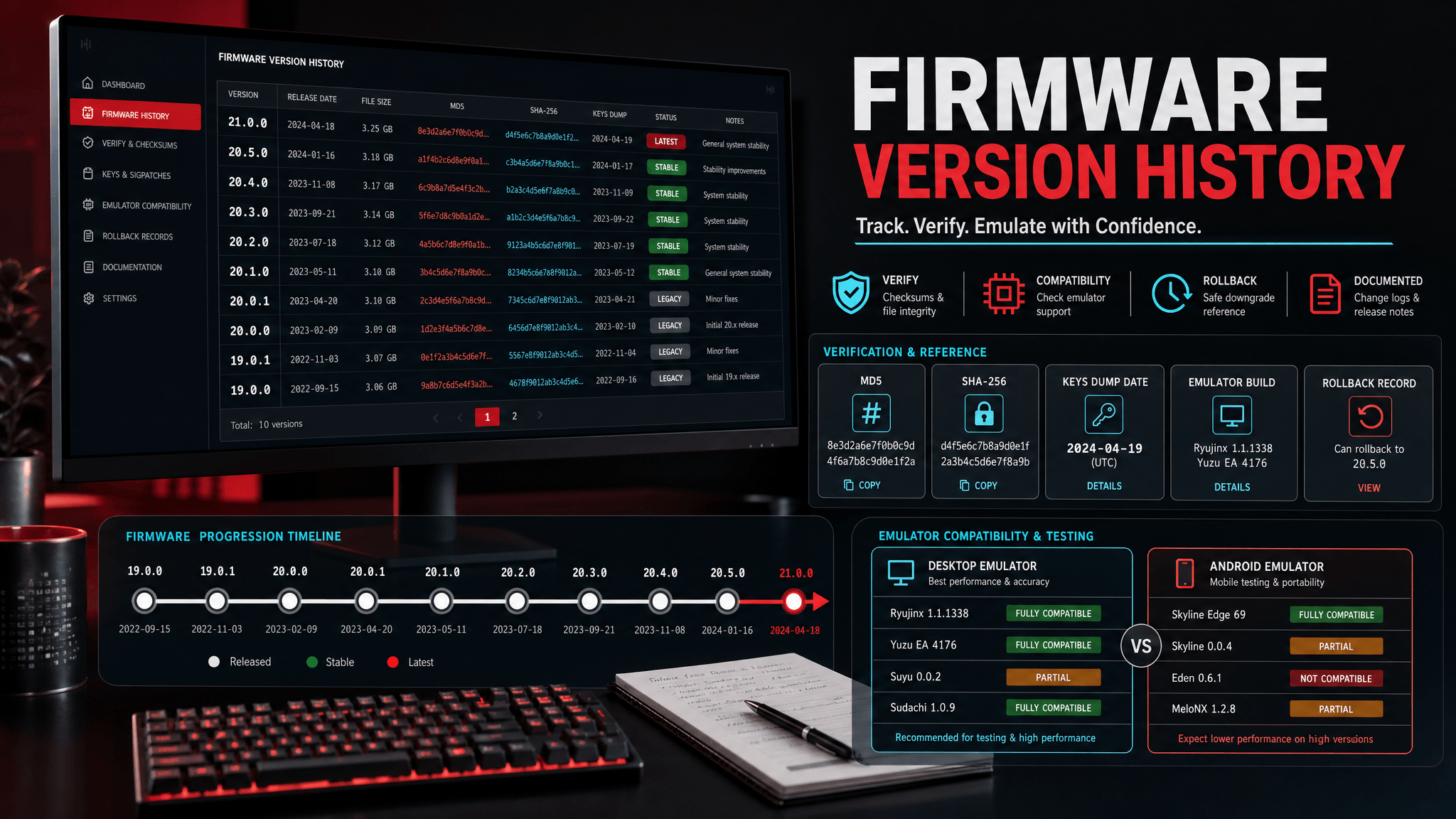
Firmware version history matters because emulator failures often come from a mismatch between firmware, keys, content, and emulator build. A version list gives you a stable reference point when a game stops launching after an update.
For emulator users, "latest" is not always the same as "best." A newer firmware can be required by a game update, but it can also expose an emulator regression, a stale keys dump, or an old cache issue. Version history gives you a way to reason about those changes instead of replacing files randomly.
This is especially important after major Switch system updates. Official release notes usually describe the public console-facing change at a high level. Emulator users need a different kind of record: which firmware version was installed, which keys dump was used, which emulator build was tested, and what changed after the update.
Without a version history, troubleshooting becomes guesswork. Users replace firmware, keys, drivers, emulator builds, and game updates in the same session. When the result changes, they cannot tell which change mattered.
Latest Version Tracked
SwitchFirmware currently tracks the latest international firmware entry in the site database on the main firmware page. The page includes file size and checksum fields so users can verify downloads before installing. For official public release timing, compare the table with Nintendo's system update history; as of the latest official support entry checked for this site, Nintendo lists Ver. 22.1.0 with an April 7, 2026 release date.
Official release timeline: Nintendo Support: Nintendo Switch System Updates and Change History
SwitchFirmware's firmware table and Nintendo's release notes serve different purposes. Nintendo's page is the authority for public release history. SwitchFirmware's table is a practical emulator setup record, focused on version tracking, file size, checksum values, and links to setup and troubleshooting pages.
Official Version History vs. Emulator Setup History
These two histories overlap, but they are not the same.
| Need | Better source |
|---|---|
| Public system update date | Nintendo release notes |
| High-level official change summary | Nintendo release notes |
| Firmware file size and checksum record | SwitchFirmware firmware table |
| Emulator install notes | SwitchFirmware guides |
| Troubleshooting after update | SwitchFirmware troubleshooting pages |
If a new firmware appears in the official timeline, that does not automatically mean every emulator user should update immediately. It means the version exists and should be recorded. Whether you update depends on game requirements, emulator support, your current setup stability, and whether you have a rollback path.
How to Use This Page
When you update firmware, record the old version, new version, emulator build, and result. If the update fixes a game, keep that note. If it breaks a game, roll back the full version combination rather than replacing files at random.
Use this simple format:
| Field | Example |
|---|---|
| Emulator | Ryujinx build/date |
| Firmware before | 21.0.0 |
| Firmware after | 22.1.0 |
| Keys dump date | Your private record |
| Test title | One known-good game |
| Result | Launches / black screen / crash / audio issue |
This is especially useful when comparing desktop and Android behavior. If the same version set works on desktop but not on Android, the problem is more likely driver, storage, or device performance than firmware alone.
How to Decide Whether to Update
Use this decision process before installing a newer firmware version:
- Check whether a game, update, or emulator guide specifically requires the newer firmware.
- Read the official Nintendo release note to understand the public release timing.
- Check whether your emulator build mentions support or known issues.
- Verify the firmware archive before installing.
- Record your current working setup before changing anything.
- Test one known-good title after updating.
You probably do not need to update immediately if your current setup is stable, the official note only mentions broad stability language, and your emulator has not mentioned the new version. You should consider updating when a specific title or emulator workflow requires it, or when you are deliberately testing compatibility.
Version Combinations Matter More Than One Version Number
The firmware number is only one part of an emulator setup. A useful history record connects multiple versioned components:
| Component | Why it matters |
|---|---|
| Firmware version | Provides system components expected by some content |
| Keys dump date | Helps identify whether private keys are stale for the setup |
| Emulator build | Determines compatibility, folder behavior, and regression risk |
| Content update version | A game update may require newer system behavior than the base game |
| GPU driver/backend | Can explain black screens or crashes unrelated to firmware |
| Cache state | Old shader or config cache can hide the real cause |
When you roll back, roll back the combination, not just the firmware archive. If firmware 22.1.0 fails on one emulator build but works on another, the firmware version alone was not the whole story.
Desktop vs. Android Version Tracking
Desktop and Android setups should be tracked separately. Android adds scoped storage, device-specific GPU drivers, thermal throttling, and memory limits. A firmware and keys combination that works on desktop can still fail on Android because the device cannot sustain the workload or the app cannot access files the same way.
For Android tests, add these fields:
| Field | Example |
|---|---|
| Device | Phone or tablet model |
| Chipset | Snapdragon/MediaTek/other |
| Driver | Stock or custom driver note |
| Storage method | Import flow, file picker, app data folder |
| Thermal result | Stable, throttles, closes app |
This keeps Android troubleshooting from being misclassified as a firmware history problem.
Update Policy
For major firmware releases, SwitchFirmware should update resource tables, emulator-specific firmware pages, and the related troubleshooting guides within the update window defined in the PRD. Each update should include a date, compatibility notes, and a short explanation of whether users need to act immediately.
The update note should answer three questions:
- Is this version present in the official Nintendo release timeline?
- Is it present in the SwitchFirmware table with file size and checksum fields?
- Are there known emulator setup notes that affect Ryujinx, Eden, Suyu, or other forks?
Common Mistakes When Reading Version History
- Assuming the newest firmware is always the best firmware for an existing setup.
- Updating firmware without recording the old working version.
- Replacing keys and firmware at the same time, then blaming whichever file was changed last.
- Using desktop success as proof that Android should behave the same way.
- Treating official release notes as emulator compatibility notes.
- Ignoring checksum verification because the archive name looks correct.
Version history is most useful when it slows you down just enough to make a reversible change.
FAQ
Should emulator users always install the latest firmware?
No. Install the version your workflow requires. If your setup is stable and no game or guide requires a newer firmware, waiting can be the better choice.
Does Nintendo's release note tell me whether an emulator supports the firmware?
No. Official notes describe Nintendo's system software changes. Emulator support depends on emulator development, build behavior, and your local setup.
Why did a game stop working after a firmware update?
The cause may be firmware, keys, content update version, emulator build, driver, or cache. Record the full version set and roll back one variable at a time.
Is a firmware table enough for troubleshooting?
No. A table gives you version and verification data. Troubleshooting also needs your emulator build, keys dump date, content version, platform, and exact error.
Related Resources
为什么版本历史很重要
固件版本历史很重要,因为模拟器故障经常来自固件、keys、内容文件和模拟器构建版本不匹配。稳定的版本列表可以在游戏更新后无法启动时提供可回溯的参照。
对模拟器用户来说,“最新”不总是等于“最好”。较新的 firmware 可能是某个游戏更新所需,但也可能暴露模拟器回归、旧 keys 转储或旧缓存问题。版本历史能让你有依据地判断变化,而不是随机替换文件。
当前追踪的最新版本
SwitchFirmware 会在主 firmware 页面 追踪站内数据库里的最新国际版固件条目。页面包含文件大小和校验字段,方便用户在安装前验证下载文件。
如何使用这个页面
更新固件时,记录旧版本、新版本、模拟器构建和测试结果。如果更新修复了某个游戏,保留这条记录。如果更新导致问题,回退整套版本组合,而不是随机替换文件。
可以使用这个简单格式:
| 字段 | 示例 |
|---|---|
| 模拟器 | Ryujinx 构建/日期 |
| 更新前 firmware | 21.0.0 |
| 更新后 firmware | 22.1.0 |
| keys 转储日期 | 你的私有记录 |
| 测试游戏 | 一个已知可用游戏 |
| 结果 | 启动 / 黑屏 / 崩溃 / 音频问题 |
这在比较桌面端和 Android 表现时尤其有用。如果同一套版本组合在桌面端可用但 Android 不可用,问题更可能是驱动、存储或设备性能,而不只是 firmware。
更新策略
对于主要固件版本,SwitchFirmware 应在更新窗口内同步资源表、模拟器专属固件页面和相关排错指南。每次更新都应包含日期、兼容性说明,以及用户是否需要立即操作的简短判断。
更新说明应该回答三个问题:
- 这个版本是否出现在 Nintendo 官方发布时间线中?
- 它是否已经出现在 SwitchFirmware 表格中,并带有文件大小和校验字段?
- 是否有影响 Ryujinx、Eden、Suyu 或其他分支的模拟器设置注意事项?
相关资源
Last updated: 2026-05-12