
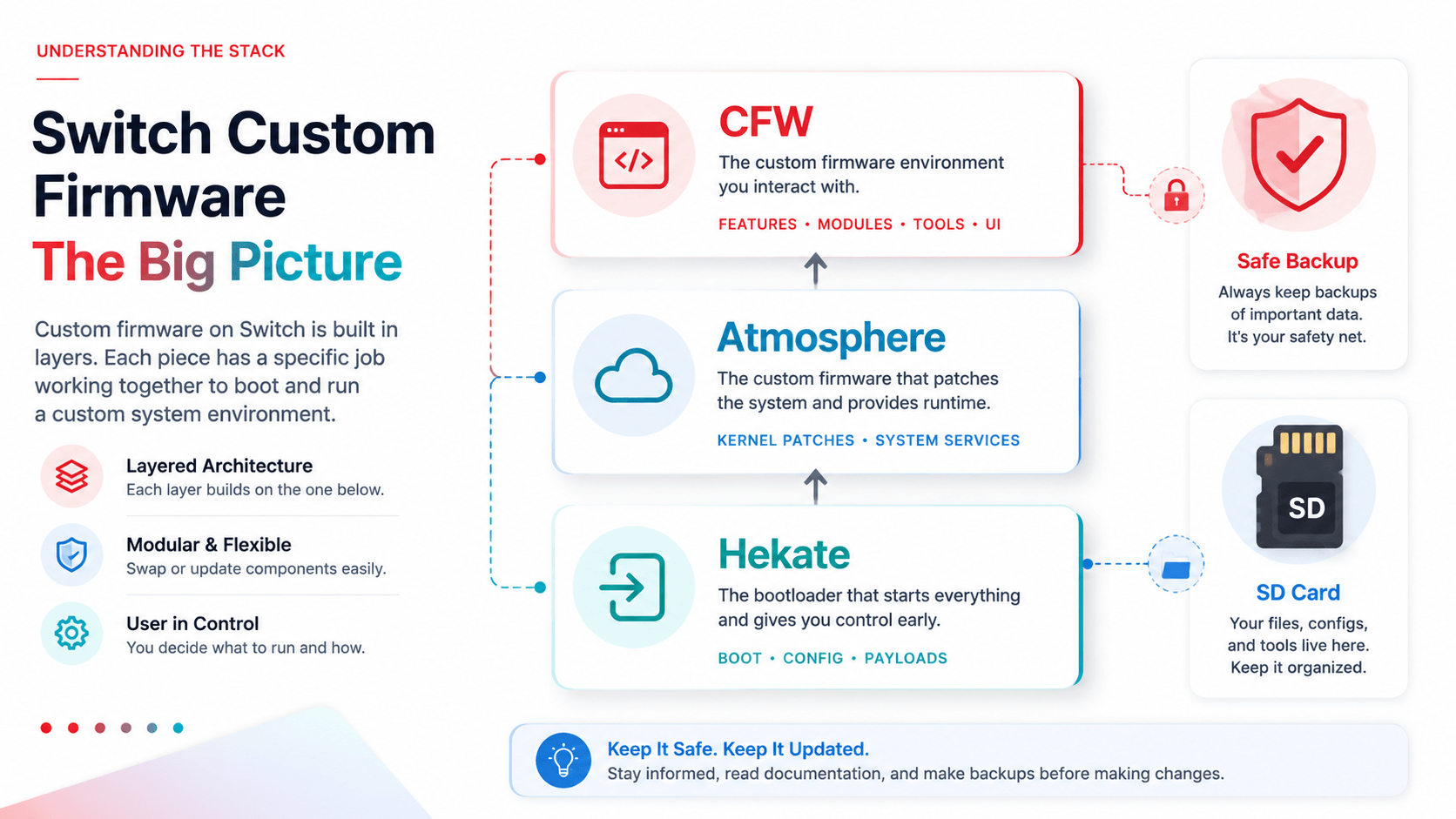
Why CFW Matters to Firmware Guides
SwitchFirmware is mostly about firmware versions, key files, emulator setup, hashes, and troubleshooting. Even so, users often arrive here after seeing terms such as CFW, Atmosphere, Hekate, SysNAND, EmuNAND, payload, or sigpatches in other guides. Those terms matter because they describe the environment where firmware files, backups, and system tools are handled.
Custom firmware, usually shortened to CFW, is community software that changes how a Switch environment boots and what tools it can run. It is not the same thing as an official firmware update. Official firmware is the system software Nintendo publishes for the console. CFW is an added layer used by advanced users to run homebrew tools, manage separate environments, and perform maintenance tasks.
For our purposes, the key question is not "how do I mod everything?" The more useful question is: how does this affect firmware safety, file verification, and troubleshooting?
The Short Version
| Term | Practical meaning |
|---|---|
| Official firmware | Nintendo's system software version |
| CFW | Community boot/runtime environment used for homebrew workflows |
| Atmosphere | The most common modern Switch CFW baseline |
| Hekate | Bootloader and maintenance menu used before launching an environment |
| SysNAND | The console's internal system memory |
| EmuNAND / EmuMMC | A copy of system memory stored separately, usually on SD |
| Payload | Small boot file used to start a tool or CFW chain |
If you are only configuring an emulator, you may never touch most of these tools directly. But understanding them helps you interpret guides and support threads more accurately.
Atmosphere: The CFW Layer
Atmosphere is commonly discussed because it provides the CFW environment many homebrew workflows assume. A clean Atmosphere setup is usually treated as the baseline before installing homebrew apps, running maintenance tools, or managing separate system environments.
For firmware users, the important idea is modularity. Atmosphere itself is not a firmware archive, a key dump, or an emulator. It is the runtime environment that allows certain tools to operate. If a guide says "update Atmosphere," that is different from "update firmware." If a guide says "firmware 21+ broke an app," that may involve the app, the CFW layer, patches, or firmware compatibility, not simply the firmware file.
Keep these distinctions separate in your notes:
- Console firmware version.
- Atmosphere version.
- Hekate version or payload chain.
- Homebrew app version.
- SD card format and file layout.
When users mix these into one vague phrase like "I updated everything," troubleshooting becomes much harder.
Hekate: The Boot and Recovery Toolkit
Hekate is best understood as a bootloader and maintenance toolkit. It runs before the main environment and can help users choose launch options, manage EmuNAND/EmuMMC, inspect storage, and create backups.
The most important concept is backup discipline. Before any risky system-level change, users should understand whether they have a NAND backup, where it is stored, and whether the backup belongs to the same console. A backup is not glamorous, but it is the thing you are grateful for when a bad update, bad SD card, or wrong file creates a mess.
For SwitchFirmware readers, Hekate matters because many firmware workflows depend on clean separation:
- Keep a known-good record before updating.
- Know whether a guide refers to SysNAND or EmuNAND.
- Do not apply console-oriented instructions to an emulator workflow.
- Do not treat bootloader updates, CFW updates, and firmware updates as one step.
SysNAND vs. EmuNAND
SysNAND is the console's real internal system memory. EmuNAND or EmuMMC is a separate copy, usually stored on SD, that can be used for isolated workflows. Many safety guides recommend separating a clean system environment from a homebrew environment.
This matters for firmware notes because "installed firmware version" can refer to different environments. A user may have one version on SysNAND and another on EmuNAND. If a guide does not specify which environment it means, slow down before following it.
Use this note format:
| Field | Example |
|---|---|
| Environment | SysNAND / EmuNAND |
| Firmware version | 22.1.0 |
| Atmosphere version | Your record |
| Hekate version | Your record |
| SD card format | FAT32 / other |
| Last backup | Date and storage location |
How This Relates to prod.keys
prod.keys is a private key file used in emulator and content workflows. CFW guides may mention key dumping tools, but SwitchFirmware's position is simple: keep key material private, work only from hardware and software you are entitled to use, and do not share the file or paste its contents into support threads.
If your goal is emulator setup, do not get lost in full console modding vocabulary. Focus on:
- Preparing private keys lawfully.
- Installing firmware through the emulator's supported flow.
- Verifying archives with hashes.
- Recording emulator build, firmware version, keys dump date, and test result.
Common Misreadings
| Misreading | Better interpretation |
|---|---|
| "Update firmware" | Which environment, console or emulator? |
| "Update Atmosphere" | CFW layer, not the firmware archive itself |
| "Use Hekate" | Boot/maintenance workflow, not an emulator step |
| "Install sigpatches" | Patch compatibility topic; do not confuse with keys |
| "Use EmuNAND" | Isolated console environment, not an emulator folder |
Practical Safety Checklist
- Keep official firmware, CFW, bootloader, and app versions in separate notes.
- Verify firmware archives before installing.
- Keep private key material private.
- Use emulator-specific guides for emulator folders.
- Use console-specific guides for console environments.
- Back up before risky changes.
- Change one variable at a time.
Related Guides
为什么 CFW 会影响 Firmware 指南
很多用户是在阅读 Switch 教程时看到 CFW、Atmosphere、Hekate、SysNAND、EmuNAND、payload 这些词后,才来到 SwitchFirmware。它们不是同一个东西,但会影响 firmware、备份、keys 和排错工作流。
简单说,官方 firmware 是 Nintendo 发布的系统软件;CFW 是社区工具构成的运行环境;Atmosphere 是常见 CFW;Hekate 是启动和维护工具。对我们来说,重点不是教你“怎么折腾一切”,而是帮助你分清这些词和 firmware/prod.keys 之间的关系。
快速区别
| 术语 | 实用含义 |
|---|---|
| Official firmware | Nintendo 官方系统版本 |
| CFW | 自定义固件环境 |
| Atmosphere | 常见现代 Switch CFW |
| Hekate | 启动器和维护工具 |
| SysNAND | 主机真实内部系统 |
| EmuNAND / EmuMMC | 通常位于 SD 卡上的独立系统副本 |
| Payload | 用于启动工具或 CFW 链的小文件 |
对 Firmware 用户最重要的事
不要把所有更新都叫成一个“更新”。Firmware 版本、Atmosphere 版本、Hekate 版本、homebrew app 版本和 SD 卡状态都应该分开记录。否则一旦出问题,你很难判断到底是哪一层变了。
Hekate 和备份
Hekate 常用于启动、维护、创建或管理 EmuNAND,并做 NAND 备份。备份并不酷,但它是出问题时最有价值的东西。任何系统级变化前,都应该确认自己是否有可用备份,以及该备份属于哪台主机。
和 prod.keys 的关系
prod.keys 是私有 key 文件,常见于模拟器和内容处理工作流。SwitchFirmware 的建议很直接:只使用你有权准备的私有材料,不分享、不上传、不把内容贴到公开支持帖里。
如果目标只是模拟器设置,不要被完整主机改机术语绕进去。优先关注合法准备 keys、通过模拟器安装 firmware、校验哈希、记录版本组合。
相关指南
Last updated: 2026-05-13